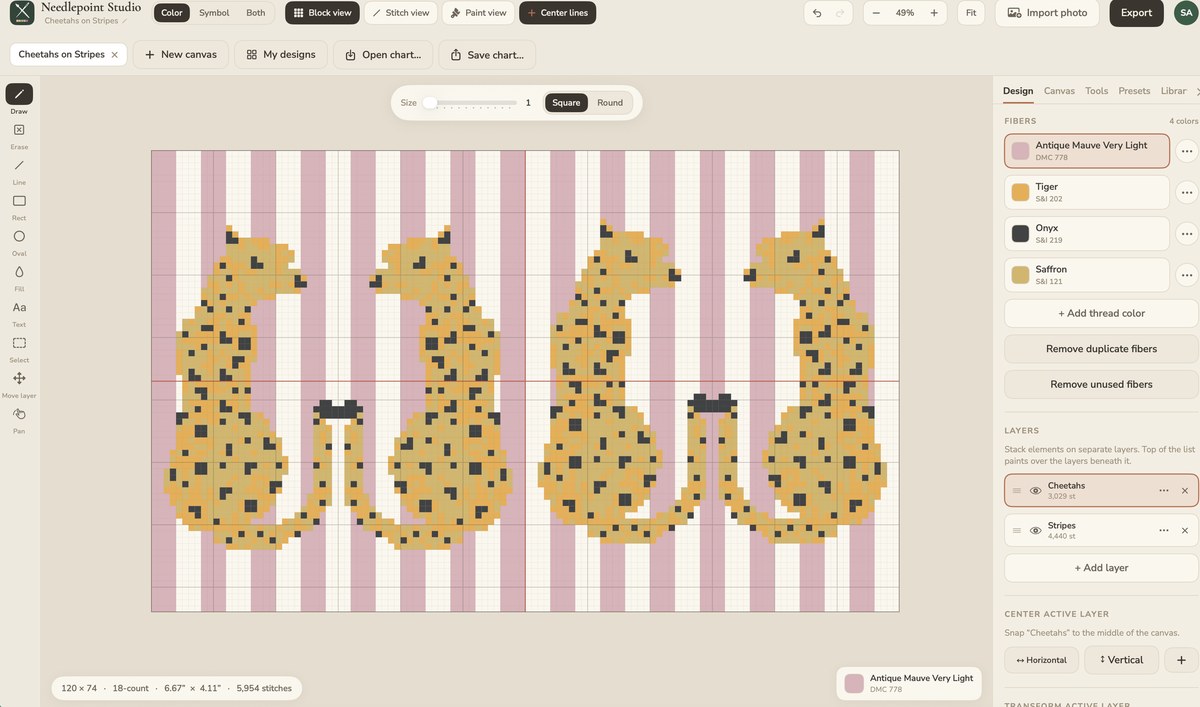
The studio built for professional needlepoint designers — superior tools, real thread palettes, and smart repeats that do the tedious work, so your hours go to the art instead of the grid.
Runs in your browser · installs on your PC or Mac · design on iPad · 7-day free trial
50%
less time from idea to finished chart
One
design, in sync across browser, PC, Mac & iPad
Ready
for the painter or printer in a single click
Why designers switch
Better tools than anything else on the market.
Most charting software was built for hobbyists and never grew up. Needlepoint Studio was built for the working designer — the precision, speed, and output of a professional studio, with none of the busywork slowing you down.
Design time, cut in half
Layers, motif libraries, one-click repeats, and photo-to-stitch handle the tedium — so the hours go into designing, not re-charting the same border by hand.
Precision, never a fight
Every stitch lands exactly where you mean it. Non-destructive move and true undo let you experiment freely and never lose your place.
Real, buyable threads
Build palettes from actual brands and numbers — the chart your customer receives is one they can source and stitch, down to the skein.
Bring your whole library
Switching costs you nothing. Open your existing MacStitch (.chart), Open Cross Stitch (.oxs), and Stitchly files right here — plus photos — so your entire back catalog comes with you on day one.
The toolkit
Precise tools that feel natural.
Everything you need to chart a monogram, a bargello repeat, a pet portrait, or a full canvas — and hand off a file that's ready to paint, print, or stitch.
Design in layers
Build your chart in stacked layers, like paint. Rearrange, hide, and refine any element — a border, a motif, the background — without disturbing the rest.
Fast, precise drawing
Draw, erase, lines, shapes, fill, and text — even curved lettering — all snapping cleanly to the grid, so your first pass looks like a finished chart.
Motifs & repeats
Save motifs to a library and tile any element into an all-over pattern with full spacing control — a whole canvas from a single stitch.
Photos into stitches
Import a photo and turn it into accurate thread coverage automatically, or trace over a reference by hand with full control.
Ready for the painter or printer
Export a file your painters and printers can work straight from — add a blank margin, stamp on your color palette, and drop in your signature, all in a single click.
Color, symbols & print-ready PDF
Switch instantly between full-color, printable symbols, both, or a realistic painted-canvas preview — then export a clean PDF chart with a complete thread key, ready to sell or stitch.
Exact & custom colors
Work in real thread brands and numbers, or dial in an exact HEX/RGB color and let the studio snap it to the closest real thread — precision for when the spec matters.
Print at true finished size
Export a PDF or JPEG at the chart's real dimensions — lay the printout under your canvas and paint every line onto the exact mesh. Oversized canvases tile across pages you tape together.
Paint mode
Paint the canvas straight from your chart.
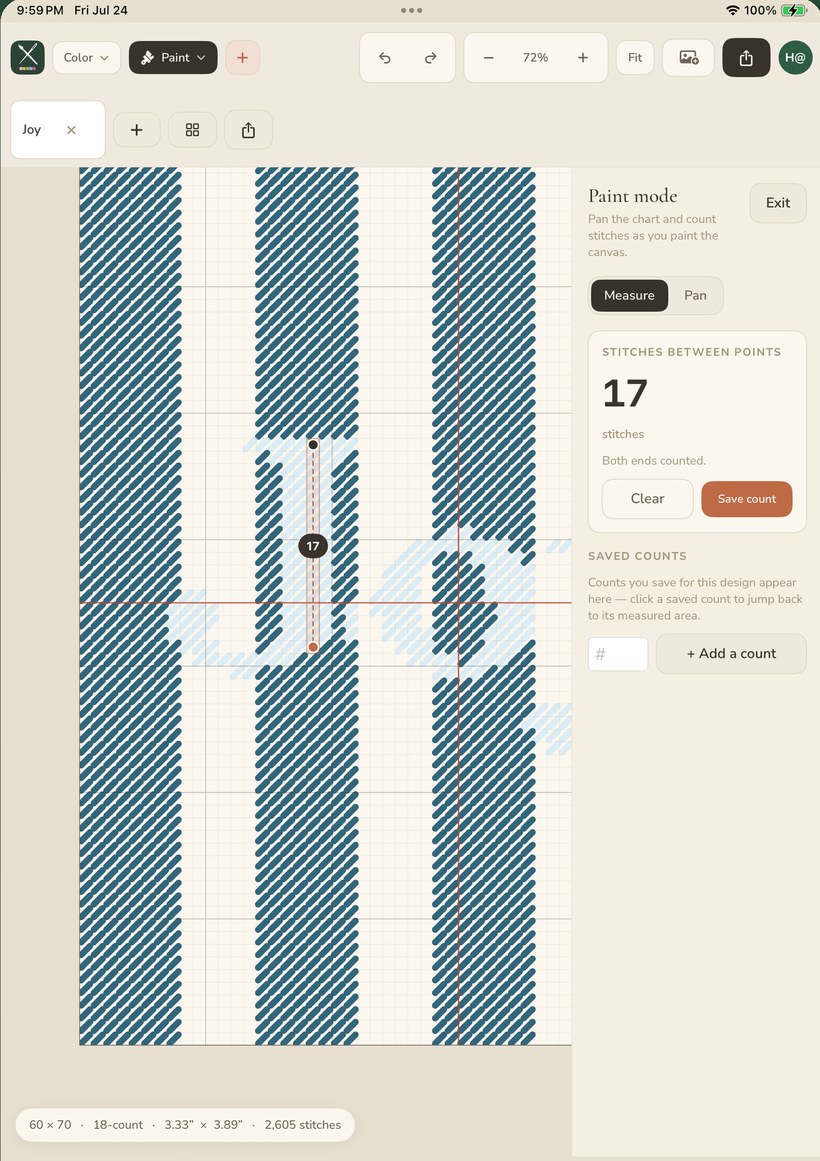
The feature hand-painted-canvas designers ask for by name. Turn any finished chart into a painting companion: tap two points to read the exact stitch count across and down, pan smoothly as you work, and save counts as you go — so every painted line lands on the right mesh intersection.
Measure the exact stitches between any two points
Live across & down counts as you paint
Save counts and pick up right where you left off
Works where you do
In your studio, on every screen.
One design, always in sync — however you like to work. Start in your browser, install it to your desktop, or design by hand on iPad.
Web & Windows PC
Design in your browser — or on your desktop.
Open it in any browser and start in seconds, or install it straight to your Windows PC, Mac, or Chromebook, where it runs like a native app right from your desktop — online or off.
Windows · Chromebook · any browser · works offline
Mac & iPad
Prefer the native app? Design with the Apple Pencil.
Get Needlepoint Studio on macOS and iPad from the App Store — draw by hand with the Apple Pencil and automatic palm rejection, and keep every design in sync.